
Enterprise structure
Organise your everything.
One structure runs everyone and everything you have, every human and every AI, across as many organisations as you need.
In plain words
What it is, where it lives, when to reach for it
- What is it
- A dashboard feature of QuoxCORE that models your company as organisations, divisions, departments and teams, for people and agents.
- Where do I use it
- In the dashboard, in the Organisation section: the Organisations, Divisions, Departments and Teams pages.
- When would I use it
- When more than one person or agent works in your instance and roles need real boundaries.
- How do I use it
- Open Organisations in the dashboard and click Create Organisation, then add divisions, departments and teams.
QuoxCORE is the free, self-hosted platform underneath this. What is QuoxCORE
Delegation
One assistant at every level of the tree.
Delegation flows down the same tree your organisation already has. Ask at the top, and the right level answers.
Model your real company, give people and assistants a place in it, and let a person step into any automated workflow exactly where judgement is required.
CommanderQ
ask at the topThe top-level assistant. Ask it anything, and it works out how far down the tree the answer needs to come from.
Organisation assistant
created with the org, automaticallyEvery organisation gets its own scope assistant the moment it is created. No setup step, it is simply there.
Division assistants
created with each division, automaticallyEvery division gets its own scope assistant the same way, the moment the division exists.
Team level
teams carry their ownTeams can carry their own assistants too, deployed and scoped to exactly that team.
At scale
Every organisation, one screen.
Run more than one company and the top level shows all of them at once, with the roll-up counts across every organisation you own.

Four organisations, twelve divisions, twenty teams, one control plane.
The shape
Four levels. Your company.
The hierarchy is fixed at four levels so every organisation reads the same way, and open-ended in width: there is no fixed limit on how many divisions, departments or teams you create under each level.
Level 1Organisation
The root. Company-wide membership and roles, the assistants and tools every member can reach, and the budgets that govern spend. Run more than one organisation if you run more than one company.
▸ budgets live here · org levelLevel 2Division
The big blocks of the business: operations, commercial, engineering. Anything scoped to a division, people, assistants, tools or workflows, belongs to that division and the levels beneath it.
▸ its own dashboard · shown belowLevel 3Department
The functional unit inside a division. Departments take the same scoping as every other level: members, roles, assistants, tools and workflows can all be pinned to one department and are hidden from members outside it. Organisation owners and admins see across the tree.
▸ same scope model · every levelLevel 4Team
Where the work happens. Teams carry their own roles, admin, member and viewer, their own assistants and their own workflows. A team is also where an approval usually lands when a workflow needs a person.
▸ team roles · admin / member / viewerRun the whole
The organisation, from the top.
The organisation dashboard is where the whole company is run: who belongs, what they may do, and what it may cost. Roles go from owner down to viewer, and monthly budgets are set at this level. Workflow and agentic runs are checked against them, with a hard stop where you configure one.
- Five organisation roles: owner, admin, builder, runner, viewer
- Members join once and are scoped anywhere beneath
- Monthly budgets set at organisation level

- 1Quick actions, one click awayCreate a division, invite a member, upload the org logo or open the inbox scoped to this organisation, all from a single panel.
- 2Every identifier in one placeSlug, organisation id, scope id and MFA policy sit together, with the enterprise plan flagged in the same panel.
- 3The organisation countedDivisions, departments, teams, members, assistants, agents, workflows, files and actions, each a live count rather than an estimate.
- 4Every division, its own tallyCreative, Development, Finance and Marketing each list their own departments, teams and members before you open one.
- 5The tree, expandableOrganisation down to division, department and team sit in one nested list, colour-coded by level.
- 6An assistant scoped to this organisationThe organisation assistant answers from inside this scope only, with its own voice controls and chat input.
Captured from the real organisation dashboard, not a mockup.
One scope model
Everything points at the same structure.
There is one scope model in the platform, and everything that matters is expressed in it. Whatever you attach to a level belongs to that level, and share policies decide exactly how far it travels: private, team, department, division, organisation, or an explicit list.
Members
People join the organisation once and take a place anywhere in the tree, from the root to a single team.
Roles
Owner, admin, builder, runner and viewer at organisation level. Admin, member and viewer inside a team.
Capability grants
Roles carry capabilities at organisation level, and scope policies can inherit from the level above.
Assistants
AI assistants deploy to any level, with a mode on each deployment.
Tools
Tools scope the same way. A tool pinned to one department is hidden from members outside it.
Workflows
Automated workflows belong to a level too, which is what lets an approval route to the right people.
Share policies
Six policies decide visibility: private, team, department, division, organisation, or an explicit list of people.
One answer to where
Because humans and AIs share the structure, the question of who sees what, and who approves what, always has one answer.

Run a slice
Each division sees its own world.
A division gets its own dashboard: the members, assistants, tools and workflows that belong to it, without the noise of the rest of the company. Departments beneath it take exactly the same scoping.
Scope is a filter as much as a window. What is pinned to Operations is hidden from members of Commercial, and a department-scoped assistant does not appear one level up. Organisation owners and admins see across the tree.
Assistants · per scope
Deploy an assistant to any scope.
Every assistant deployment names a scope and a mode: private, shared or public. The deployment is recorded against the scope you choose, and members in that scope and below can find the assistant there.
Deployments are set per scope, so the same assistant can be deployed to one department without being offered to the rest of the division.
assistant  support-triage
scope      department · support
mode       private

assistant  drafting-aid
scope      division · commercial
mode       shared

assistant  research-desk
scope      organisation · acme group
mode       public
Humans-in-the-loop
A human is a node in the workflow.
This is what the structure is for. When automated work reaches a decision that needs a person, the person is not outside the system watching. They are a step in the flow, an approval or feedback node like any other, and the hierarchy is how the decision finds them.
An automated workflow executes at machine speed: steps, tools, agents, whatever you built.
You placed an approval or feedback node in the flow where judgement is required. The workflow holds there.
The request lands in the inbox of the person or team you routed it to in the hierarchy, with the context attached.
Approve and it resumes. Deny or give feedback and it takes that path instead. Either way the run carries on with a human decision inside it.
Concept demo · an approval node holds the run until a person decides

One structure. Scoped by default.
every request org-boundorg-level budgetssix share policies
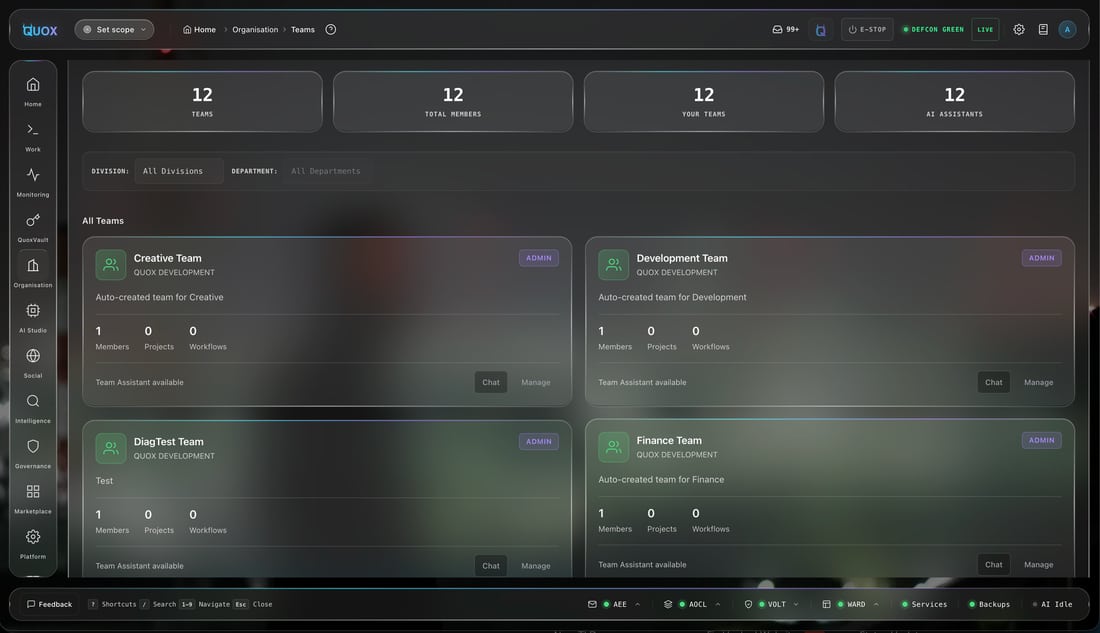
Where work happens
Teams carry their own keys.
A team is the sharpest scope in the tree. It has its own roles, admin, member and viewer, its own assistants and its own workflows, and it is usually the level an approval routes to when a workflow holds for a person.
- Team roles: admin, member, viewer
- Assistants and workflows scoped to a single team
- Manage every team from one view
Clients join the same structure.
Planned: clients as a third entity beside your humans and your AIs. Assign a client at any level of the hierarchy, and the agents, people, workflows and evidence that serve that client scope to it the same way everything else already scopes to a team or a division.
Agencies and service firms will run client work inside the structure they already have, rather than bolting a CRM onto the side. This page will say so plainly when it ships.
One structure
Model your company. Run everything in it.
Create your organisation, shape the tree, and give every human and every AI a place, with a person in the loop wherever you decide one belongs.
Go deeper